 |
|
 03-29-2009, 07:50 PM
|
#1 |
|
Tri-State Addict
|
Photoshop CS2 Help
these are the steps i was doing: 3 photos - different exposures file - automate-merge to HDR Select the files (.jpg) Hit ok this is when the dynamic range error ocurs as it is blending the photos any help is greatly appreciated as ive just started to mess with photography and photoshop |

|

|
|
03-29-2009, 08:07 PM
|
#2 | ||
|
TST Ruined My Life!
 |
how far apart are the exposures? if i do 3 shots, i -2 0 +2 stops.
__________________
To view links or images in signatures your post count must be 10 or greater. You currently have 0 signatures. Quote:
Quote:
|
||
|
|
|
|
03-29-2009, 08:34 PM
|
#3 |
|
Tri-State Aficionado
Join Date: Mar 2008
Location: Lower Gwynedd
Member #7362
My Ride: 93 Honda Prelude VTEC iTrader: (1)
|
This might help. I used it when I was trying to make HDR's in Photoshop and didn't feel like shelling out the money for Photomatix.
http://backingwinds.blogspot.com/200...dr-images.html |
|
|
|
|
03-30-2009, 12:16 AM
|
#5 |
|
Tri-State Post Whore

|
Edit: just realized that was for film...
Try this. PS reads the exposure from the Exif info if available so you need to get rid of the Exif info from the different exposures you make. This is easily done by selecting all, copying to clipboard, creating a new image based on the clipboard and pasting into it. You now have a copy of your image without the Exif. Save the file and repeat for each different exposure you want to merge. Now you can merge the different files you've created but as there is no Exif to provide the exposure values you will be asked to provide them yourself.
__________________
Thank you for flying Air force Airlines. Oh me? They call me The Captain. - "America is all about speed - hot, nasty bad-ass speed." Eleanor Roosevelt (1965) Last edited by The Captain; 03-30-2009 at 12:20 AM. |
|
|
|
|
03-30-2009, 02:17 PM
|
#7 |
|
Tri-State Addict
|
alright well here is my very first attempt. the table/books/lamp area is kinda blurry but the way the plant turned out looked kinda nice.
still a lot of work to go but i guess thats a good foundation to work off of 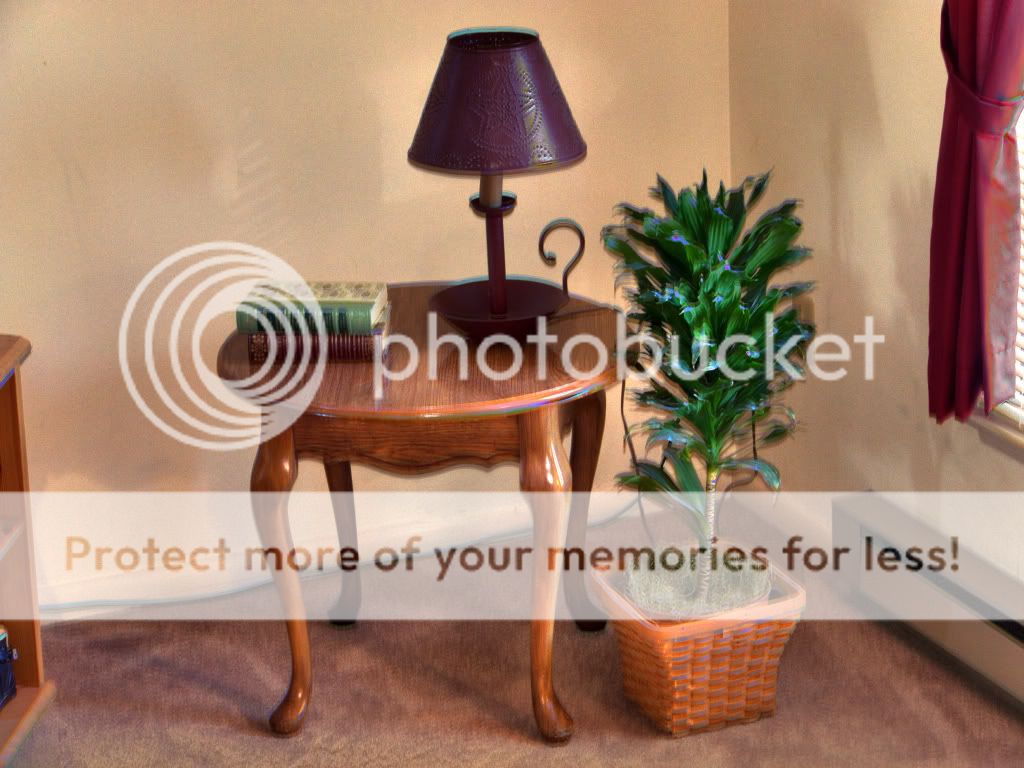
|
|
|
|
|
03-30-2009, 03:16 PM
|
#10 |
|
TST Ruined My Life!
|
shoot bracketed in RAW and then do +- 1 exposure on the far ends when you process to JPG. that way it'll fire 3 shots and you dont have to touch the camera.
__________________
FOR SALE! Canon 5D|17-40L|85mm f/1.8|Sigmalux|580ex
|
|
|
|
|
03-30-2009, 05:13 PM
|
#13 |
|
Tri-State Post Whore
|
hmmm...are you only merging them to HDR with cs2? No tone mapping? No post merge editting?
__________________
Thank you for flying Air force Airlines. Oh me? They call me The Captain. - "America is all about speed - hot, nasty bad-ass speed." Eleanor Roosevelt (1965) |
|
|
|
|
03-30-2009, 05:18 PM
|
#14 |
|
Tri-State Addict
|
haha your gonna have to fill me in on that stuff. i just got the camera a few weeks ago, and just got CS2 last week. and i only mess around with it for about a couple hours a week
|
|
|
|
|
03-30-2009, 05:23 PM
|
#15 |
|
Tri-State Post Whore
|
is the issue with CS2 complaining about the dynamic range resolved?
If so, then you just need to know the proper ways to create an HDR image. It's not just merging through photoshop. There's a good walkthrough somewhere, let me see if i can find it Edit: Not sure how closely this matches cs2...but watch this. http://www.youtube.com/watch?v=s14rvLKKH60
__________________
Thank you for flying Air force Airlines. Oh me? They call me The Captain. - "America is all about speed - hot, nasty bad-ass speed." Eleanor Roosevelt (1965) Last edited by The Captain; 03-30-2009 at 05:28 PM. |
|
|
|
|
03-30-2009, 05:29 PM
|
#16 |
|
Tri-State Addict
|
yea i got the dynamic range fixed. the way im creating these is through File > Automate > Merge To HDR. and then adding the photos, then changing the photo to a 16 bit/channel and messing with options that come up on the screen it creates
i guess im gonna look at some photography forums |
|
|
|
|
03-30-2009, 05:46 PM
|
#19 | |||
|
TST Ruined My Life!
|
Quote:
__________________
To view links or images in signatures your post count must be 10 or greater. You currently have 0 signatures. Quote:
Quote:
|
|||
|
|
|
|
03-30-2009, 06:48 PM
|
#20 |
|
Tri-State Post Whore

|
HDR really is meant for merging extreme light and dark exposures, for instance:
 Notice the intensity/brightness of the fire, compared to the kitchen light. Your examples don't really have much variation in light intensities. You should read up on. TST HDR Thread. there are some good articles in the first post.
__________________
To view links or images in signatures your post count must be 10 or greater. You currently have 0 signatures. |
|
|
|
 |
| Bookmarks |
|
|
 Similar Threads
|
||||
| Thread | Thread Starter | Forum | Replies | Last Post |
| photoshop help? | Little Kev | Photography | 2 | 04-21-2008 08:06 PM |
| photoshop help | jdm free | Gallery | 7 | 03-10-2008 12:14 AM |
| Photoshop help please | 012.5RS | Gallery | 0 | 03-06-2008 09:05 AM |
| Photoshop help? | the4g63 | Photography | 0 | 10-31-2007 06:29 PM |
| Photoshop help pls | 012.5RS | Gallery | 4 | 03-25-2007 02:36 PM |





 Linear Mode

