 |
|
 04-29-2008, 03:23 PM
|
#1 |
|
Tri-State Post Whore
|
Interior Lighting Suggestions/Tips...
 ) on an old Canon Rebel. I've been meaning to grab just the stock lens off one of the forum members, but for now I am trying to work on the photoshop end of the pictures. I've found that setting the exposure on the camera a bit long makes for the best "photoshopable" pictures, and toying with, first, the brightness/contrast, and second, the highlight/shadow makes for the best pictures. What other functions can I use to take the best interior lighting pictures? Showing the actual LIGHTING isn't all that important, just what it does/how it highlights. ) on an old Canon Rebel. I've been meaning to grab just the stock lens off one of the forum members, but for now I am trying to work on the photoshop end of the pictures. I've found that setting the exposure on the camera a bit long makes for the best "photoshopable" pictures, and toying with, first, the brightness/contrast, and second, the highlight/shadow makes for the best pictures. What other functions can I use to take the best interior lighting pictures? Showing the actual LIGHTING isn't all that important, just what it does/how it highlights.Low quality example: Before  After 
|

|

|
|
04-29-2008, 03:32 PM
|
#3 |
|
Tri-State Post Whore

Join Date: May 2006
Location: Glenside, PA
Member #1962
My Ride: 2001 Audi A6 2.7 Twin Turbo iTrader: (4)
|
i personally like all your before shots better. what your doing in the chopped ones is making them look played with. I would definitely lighten up with the lighting and keep with the warmer feeling you initially started with. It gives the wood more of a....wood look IMO.
__________________
--Eric '96 Mazda Miata | FM V-Maxx Coilovers | Jackson Racing Exhaust/Intake GONE To view links or images in signatures your post count must be 10 or greater. You currently have 0 signatures. 01' Audi A6 2.7 Twin Turbo | Daily | NoMods |
|
|
|
|
04-29-2008, 03:35 PM
|
#4 |
|
Tri-State Addict

|
sweet we have the same table idk im not a pro at taking pics but they are a little too bright for me they look unnatural almost just my opinion though
__________________
To view links or images in signatures your post count must be 10 or greater. You currently have 0 signatures. |
|
|
|
|
04-29-2008, 03:43 PM
|
#7 | |
|
Tri-State Post Whore
|
Quote:
I want it to have the look of almost being "surreal", just because that's the style everyone seems to be going with. |
|
|
|
|
|
04-29-2008, 04:28 PM
|
#8 |
|
Tri-State Post Whore
  |
The before photos I see are nicer to me. More contrast, while the edited ones seem flat and dull. If you can lower your Aperature and raise the ISO up a setting. You don't need to shoot at F/22 to get every thing in focus, the out of focus items will be a little soft that is all. This will help cut down the darkness you are speaking of. Also since you said you have Photoshop you could do that HDR style. Take 3 or more photos at different exposures and then merge them into a HDR photo and then tweak from there.
__________________
I drive the grand kids around To view links or images in signatures your post count must be 10 or greater. You currently have 0 signatures. To view links or images in signatures your post count must be 10 or greater. You currently have 0 signatures. |
|
|
|
|
04-29-2008, 04:48 PM
|
#9 |
|
Tri-State Post Whore
|
Alright, I just raised my monitor settings up to 100 on the brightness and everything is a lot brighter, and the original pictures do look better than before.
howielong, I'll see what I can do. Does anyone know if it's better to just try taking these at night, or save them for the day? |
|
|
|
|
04-29-2008, 05:06 PM
|
#10 |
|
Tri-State Post Whore
|
Alright, I played with the ISO settings, and lessened the exposure time....it's slightly darker outside, but still bright...
Before/UNtouched: I like it better without even going in to photoshop, it seems like the ISO settings were the key so far...I also didn't use the timer, so there might be some blurriness in these...this is also with the general/recessed lighting turned off...  And After: (perhaps still too bright??) 
Last edited by ITSTOCK; 04-29-2008 at 05:11 PM. |
|
|
|
|
04-29-2008, 05:15 PM
|
#11 |
|
Tri-State Post Whore

|
use artificial lighting and shoot at night or dusk. if you look at the sample shots you posted it's dark outside. helps make the inside better.
I ran into this challenge when doing a shoot for my work. we designed window displays for a high end jewelry store in NYC. one side is a plasma screen, the other is a jewelry case. I had to shoot during the day, and i wasn't allowed to bring lighting equipment.  I set the exposure long enough to expose the interior correctly, but everything outside the windows is blown out. I set the exposure long enough to expose the interior correctly, but everything outside the windows is blown out. 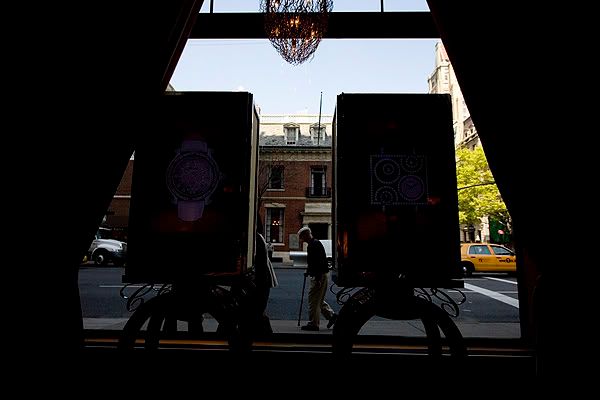 exterior properly exposed 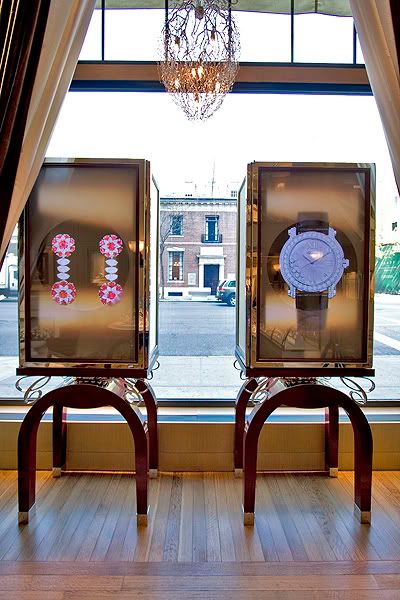 interior properly exposed (played with shadows and highlights as well) or like howie long said, use HDR for what it was intended to be used for. perfect exposure of both. Thats how i will eventually edit mine, if i ever get the time.
__________________
To view links or images in signatures your post count must be 10 or greater. You currently have 0 signatures. |
|
|
|
|
04-29-2008, 05:21 PM
|
#12 |
|
Tri-State Post Whore
|
I will try to get in to the whole HDR process when I have time, it's just a bit time consuming right now. Playing with the ISO setting definitely helped a lot in the process though. Also, the sample pictures I posted were in the day time...but I do hope they will look better in the dark.
Lastly, does this one look too overdone just like the originals? Or is it getting closer? (ignore the early 90's run way lighting!)  Damn I suck. Last edited by ITSTOCK; 04-29-2008 at 05:36 PM. |
|
|
|
|
04-29-2008, 05:48 PM
|
#14 | |
|
Tri-State Addict
|
Quote:
__________________
To view links or images in signatures your post count must be 10 or greater. You currently have 0 signatures. |
|
|
|
|
|
04-29-2008, 05:51 PM
|
#15 | |
|
Tri-State Post Whore
|
Quote:
|
|
|
|
|
|
05-17-2008, 09:25 PM
|
#16 |
|
Tri-State Post Whore
|
...unedited with new lens...
 I like it without editing, a bit longer exposure and that's it, but any suggestions if I needed to edit this? It's about as "natural" as it gets IMO (comparing it to just looking at it, it's the most realistic portrayal). |
|
|
|
|
05-17-2008, 09:36 PM
|
#17 | |
|
Tri-State Post Whore

|
Quote:
|
|
|
|
|
|
05-18-2008, 10:18 AM
|
#18 |
|
Tri-State Post Whore
|
exposure looks ok, I'd probably use some burn and dodge in various places to change the exposure in some areas. For instance above the upper cabinets, I'd darken that more, to push the focus more to the center. Thats personal choice though. I think some lighting over the sink would be nice as well. i also would raise the camera or move those foreground chairs, they really take away from the photo.
__________________
To view links or images in signatures your post count must be 10 or greater. You currently have 0 signatures. |
|
|
|
 |
| Bookmarks |
|
|
 Similar Threads
|
||||
| Thread | Thread Starter | Forum | Replies | Last Post |
| Looking for oil opions/suggestions/tips/advise | ThatTealHatch | General Car Related Chat | 49 | 10-19-2008 11:14 AM |
| interior lighting quick question | 92talonTSI | Ask The Law | 5 | 03-31-2006 10:45 PM |
| Tips on spraying interior plastic trim and vinyl. | GeforceXtreme | Exterior, Interior, and Electrical | 8 | 03-14-2006 03:39 PM |




 Linear Mode

