 |
|
 10-15-2006, 12:34 AM
|
#1 |
|
Tri-State Post Whore

Join Date: Feb 2005
Location: Pennsylvania
Member #152
My Ride: 1998 Eclipse GSX, 2012 WRX Premium iTrader: (1)
 |
Mitsubishi CAPS & How-To
First off, it can be downloaded from here: http://www.stealth316.com/2-wincaps.htm Secondly, I'm going to do my best to explain how to use it. Say you needed new Turbo Bolts for your 2G turbo DSM. You're going to need a VIN number for the type of car you need a part number for. I usually go to Autotrader.com and find a similiar car and use their VIN number since I usually don't have my VIN number handy. Enter in your VIN number in the box next to where it says "Vin-No" and hit enter. The double-click in the empty box next to where it says "Illustration." I highlighted both in yellow: 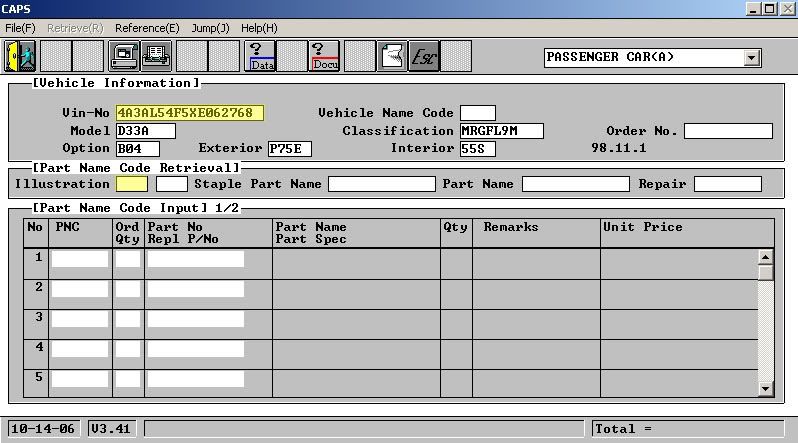 That will then bring up this screen: 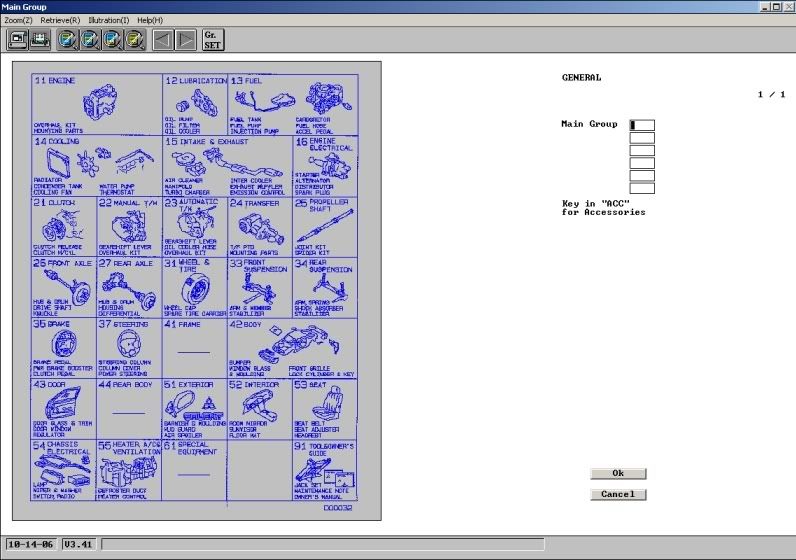 You then double - click on the Number for the section your part is located in. Since I am look for Turbo Bolts, I'm going to click on 15 - Intake and Exhaust. This will then bring you to several Sub-Groups. (If you look in the top right hand corner you will see it says "1/1". That means there is only one page of diagrams for this group. Sometimes there will be more then one page and in that case you will use the arrows in the top middle to switch over to the next page.) I double-click on Sub Group 410 - Turbocharger to find the part number I need. This then brings you to a diagram that looks like this: 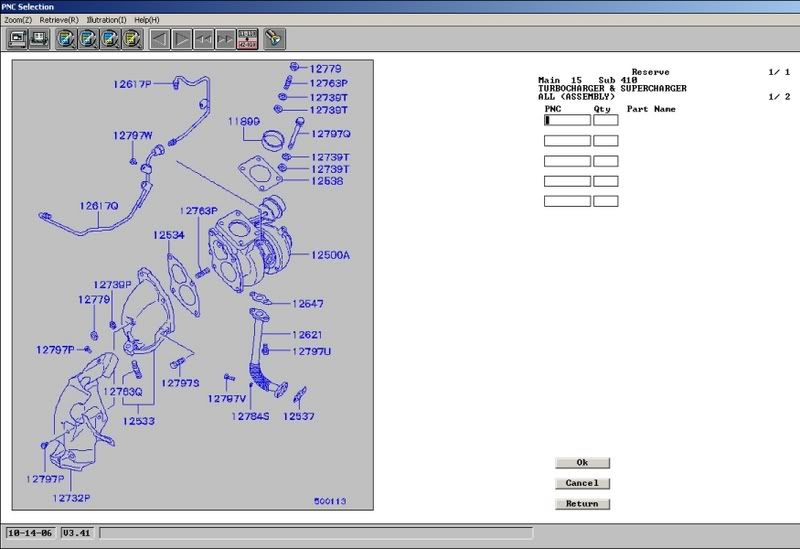 I then click on the number for the part I need. Turbo Bolts would be 12797Q. I hit OK at the bottom right and this then brings you back the the Main CAPS screen and tells you the Part Number for this part. It also tells you how many of these total are used on the car under "Qty" [Note: Double clicking the number on the diagram will automatically bring you to the main screen without having to click OK. Clicking on it just once will allow you to select more then one part before having to go the main screen]. If you want to go back to the same Sub-Group you were just in, double click in the second box next to where it says Illustration. If you double click in the box directly next to where it says Illustration, it'll bring you back the main group. After all this is completed, I usually then head on over to MitsubishiParts.net and type the part number into their Search to see how much this part is going to cost me. Well, I hope this helps. Let me know if you have any questions on how to use it 
__________________
- Jessica 1998 Eclipse GSX 11.2 @ 126 To view links or images in signatures your post count must be 10 or greater. You currently have 0 signatures. Last edited by TROLL; 10-15-2006 at 12:38 AM. |

|

|
 |
| Bookmarks |
|
|


 Linear Mode

